





























WhatsApp Username Feature: How to Reserve Yours and Ditch Your Phone Number (2026 Complete Guide)
WhatsApp usernames are finally here. Reservations opened globally on June 29, 2026, letting all 3 billion users claim an @handle and stop sharing their phone number with strangers. This complete guide covers exactly how to reserve your WhatsApp username, the naming rules, the new username key feature, the global rollout timeline, what it means for businesses, and answers to every common question researched and verified against the latest official WhatsApp announcement and trending coverage
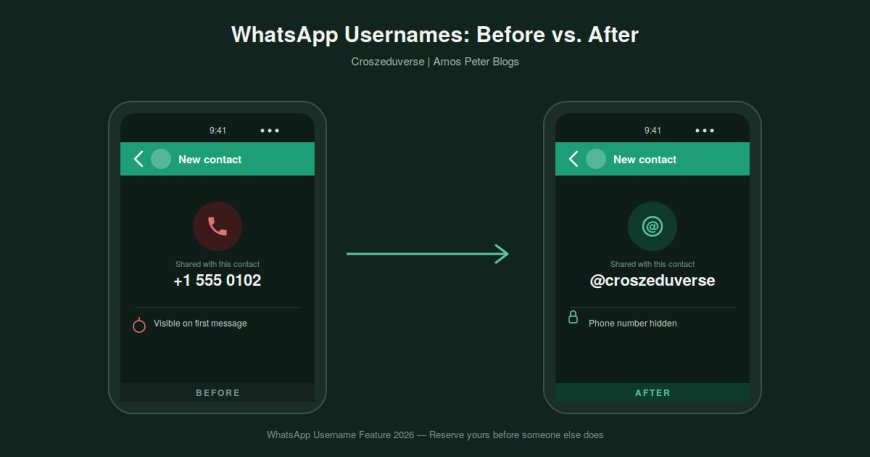
For 17 years, your phone number was your WhatsApp identity. Every chat, every group, every business order started with you handing over the one piece of personal information tied to your bank, your doctor, your family, and pretty much your entire life. That finally changes. On June 29, 2026, WhatsApp officially opened username reservations to all 3 billion of its users worldwide and the obvious handles are already disappearing fast.
This guide walks through everything confirmed so far: how to reserve your username right now, the exact naming rules, the new "username key" privacy layer nobody else has, the rollout timeline, and what it means if you run a business on WhatsApp.
What Is the WhatsApp Username Feature?
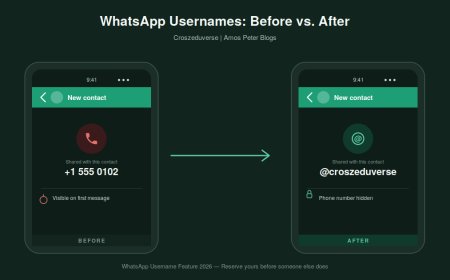
A WhatsApp username is an optional, unique handle written as @yourname that you can share with new contacts instead of your phone number. Once the feature is fully live in your country, anyone messaging you for the first time through your username will not be able to see your phone number at all. Your number stays attached to your account in the background for login and account recovery, but it stops being the thing you have to hand out to every new classmate, neighbor, delivery driver, or stranger from a Facebook Marketplace listing.
This puts WhatsApp roughly a decade behind Telegram, which has had usernames since 2013, and a few years behind Signal. But WhatsApp's version comes with two things neither of those apps offer: a built-in username key for extra protection, and the ability to inherit a username you already own on Instagram or Facebook.
Why WhatsApp Is Doing This Now
In WhatsApp's own announcement, the company put it simply: a phone number is personal, and handing it over the moment you meet someone new can feel like too big a step. Usernames are designed to remove that friction for joining a parent group chat at school, talking to a new client, or chatting with someone you matched with online without forcing you to create a separate account anywhere else.
With over three billion accounts already on the platform, name collisions are inevitable, which is exactly why WhatsApp opened reservations months before the feature actually goes live. If you want a clean, recognizable handle, the smart move is reserving it today rather than waiting for launch day, when most short and brandable names will already be gone.
How to Reserve Your WhatsApp Username Right Now
Reserving a username takes about ten seconds and works on the latest version of WhatsApp for Android, iPhone, and the Help Center's documented flow. Here's the exact path:
- Update WhatsApp to the newest version from the Play Store or App Store.
- Open the app and tap your profile photo.
- Tap Create username (in regions still mid-rollout, this may appear as Reserve username).
- Type your desired handle. WhatsApp instantly tells you if it is available.
- If it's taken, tap into the built-in username generator, which suggests close alternatives based on what you typed.
- Optionally, set a username key for extra protection (more on this below).
- Tap Save, then Done. You'll see a confirmation message such as "You reserved @yourname."
If you don't see the option yet, your account simply hasn't received the rollout. Keep the app updated — WhatsApp will send an in-app notification the moment usernames become available where you live.
WhatsApp Username Rules: What You're Allowed to Pick
WhatsApp has published strict formatting rules to cut down on impersonation and phishing risk. Your username must:
- Be between 3 and 35 characters long.
- Contain at least one letter (it cannot be only numbers).
- Use only lowercase letters, numbers, periods, and underscores.
- Not start with "www." and not end with a domain like .com or .net.
- Be unique across Meta's platforms - meaning your exact handle can't already be taken on Instagram, Facebook, or WhatsApp itself.
Notable accounts get extra protection too. WhatsApp has pre-reserved handles that match celebrities, public officials, and well-known organizations, so even on day one, plenty of recognizable names will already show as unavailable to prevent impersonation.
The Username Key: WhatsApp's Extra Privacy Layer
This is the part most competitor messaging apps don't have, and it's arguably the most interesting detail in the entire rollout. Alongside your username, you can set an optional username key during the reservation phase, a 4-digit code (expected to become a full alphanumeric code once the feature fully launches).
Here's how it works in practice: a brand-new contact needs to know both your username and your key before they can send you a first message. So instead of just saying "message me at @yourname," you'd tell someone "message me at @yourname, key 4821." Without both pieces, the message simply won't go through.
The key requirement is automatically skipped for:
- Existing contacts who already have your number saved.
- Members of a shared group chat with you.
- Anyone you've already exchanged messages with, regardless of how the conversation started.
In other words, the key only matters for that very first message from a brand-new stranger exactly the scenario usernames are designed to protect against.
No Directory, No Search, No Suggestions - By Design
Unlike Instagram or X, WhatsApp is deliberately not turning this into a discovery feature. There is no public username directory to browse, and the app won't recommend accounts to message based on your contacts or activity. Someone has to already know your exact username before they can reach out. This single design choice is what keeps WhatsApp's version of usernames from becoming a spam or stalking vector the way open directories can on other platforms.
Claiming Your Instagram or Facebook Username
If you're a creator, small business, or organization that already has brand recognition on Instagram or Facebook, you don't have to start from scratch. As long as it isn't already taken on WhatsApp, you can claim the identical username you use on those platforms by linking WhatsApp to the same Meta Accounts Center. This keeps your identity consistent across every app you post on — one handle, three platforms.
Global Rollout Timeline
Here's the timeline as confirmed across official WhatsApp statements and early reporting:
- June 29, 2026 - Username reservations open worldwide. You can claim a handle now, but it won't be active for messaging yet.
- Coming months (2026) - The feature itself activates gradually, country by country. You'll get an in-app notification the moment it's live where you are.
- Businesses on the WhatsApp Business API have a separate, harder deadline: systems need to support the new Business-Scoped User ID (BSUID) alongside usernames, since phone numbers will no longer be the only way to identify a user in chats and system logs.
If your reserved username doesn't work for messaging yet, that's expected — reservation and activation are two separate steps.
What This Means for Businesses
If you run customer support, sales, or marketing through WhatsApp, this update isn't optional reading. A few key points:
- Existing customer phone numbers stay safe. WhatsApp automatically maps a customer's phone number to their new identifier the moment you message them, so businesses don't lose existing relationships when a customer adopts a username.
- You can still message numbers you already have. If a known customer sets a username, you can keep messaging their saved number exactly as before.
- CRMs, bots, and analytics need updating. Any system built around phone numbers as the unique identifier should start planning for the BSUID field WhatsApp has added to its developer documentation.
- Branding gets easier. A recognizable @handle builds more trust and consistency than a string of digits, especially for businesses already active on Instagram or Facebook.
Frequently Asked Questions
Is the WhatsApp username feature mandatory? No. WhatsApp has confirmed usernames are completely optional. You can keep using the app exactly as you do today, with your phone number, if you choose not to set one up.
Will people still see my phone number after I set a username? Only existing contacts and group members will still see it, since they already have it saved. Anyone messaging you for the first time through your username will not see your phone number, as long as you've enabled your username.
Can I change my WhatsApp username later? Yes. WhatsApp allows you to change your username at any time, as long as the new one follows the same character and uniqueness rules as your first pick.
What happens if my desired username is already taken? WhatsApp's built-in generator will suggest close alternatives automatically, similar to how sign-up flows on other apps handle taken usernames.
Does reserving a username mean it's active immediately? No. Reserving locks the name in for you, but actual username-based messaging only activates once the feature rolls out fully in your country you'll get a notification when that happens.
Final Thoughts
WhatsApp usernames close one of the platform's longest-standing privacy gaps: the requirement to hand your real phone number to anyone you want to talk to. Between the no-directory design, the optional username key, and the ability to inherit your Instagram or Facebook handle, this is a more privacy-conscious take on usernames than most other messaging apps offer. If you've been holding onto a specific name for years, now is the moment to lock it in reservations are open, and the easy handles won't last long.
What's Your Reaction?




-
 SusanThank you for the update. Finally, a blog that is straight to the point. Good Job!
 -
Arnold KavochiThat is great